Over the last few issues I’ve looked at the good, the bad and the ugly sides of AI as it affects us in print on demand, so for now, as this is our summer break, I’m going to concentrate on some examples that still require a healthy amount of human skill and judgement. I did try and consult some of the more popular cyber wisdom but had to conclude that I’m too old and set in my ways to learn a new language model. It may be fine for the new generation of university students, for whom artificial intelligence is apparently the automatic choice, and who are not phased by a continuous stream of new acronyms. But after more than a few decades I already have more than enough obscure initials in my head without making room for new ones.
That’s especially if they stand for things we are assumed to understand, or are created to sound more complicated than they actually are by people who want to sound more clever than they actually are. And as there are only so many letters in the alphabet, and a finite number of descriptive nouns, it’s more than likely that some titles will be duplicated with possibly confusing or even dangerous results.
In doing my research for this month’s column I thought I’d better get up to speed on the latest trends in AI assistants but found that most of the online guides were full of exactly that sort of verbal abbreviation leaving me even more at sea than I was before. So I thought I would find out where and when the acronym because there must have been a use of language without them. And rather than consult the latest bot, I asked the now ancient wisdom of Wikipedia, without the social embarrassment which might affect a younger person, even if they knew it existed.
What I discovered was very interesting because Wikipedia was, is still, fed by people not only with a wealth of knowledge and a wish to share it, but a curiosity in all related things that encompasses not just the immediate enquiry, but other historic facts, details and links that come under the category of serendipity - useful things found by accident.
This is the very opposite of question based enquiry which is the basis of the popular modern programmes. The problem with a search engine is always that you only find what you are looking for, not something that may be equally relevant. So I found that the acronym became common in the 1940s, when technical progress was creating items with complicated descriptive names.
So we have AI as a shortcut now used for anything we don’t really understand. There’s a significant difference between the advances in machine learning that have vastly improved image editing, and artificial actions that generate an entirely new one, or one created from an original.
It is the former that is at the heart of this column as we are primarily concerned with the repair or restoration of files we didn’t create in order to make them suitable for print. So don’t expect any magic buttons to be discovered here. Much of the development is entirely logical in computer terms as it is the progressive intelligence of all editing software- not just Photoshop - along with the increasing performance of the hardware. Where Adobe has an advantage is partly due to its long history and the accumulated data from which it can learn.
While there are now numerous alternatives, they all work around a similar process dictated by the very pixels on which they work. So any examples should translate to other programmes, even if they have different names the actions should be the same. The basic principles of photography are the same as they have always been - capturing the contrast between light and dark. The difference with digital is how that capture is stored in that unlike film, which was relatively seamless, the electronic image is made up of very definite pieces - more like a giant jigsaw than a smooth painting. Using that analogy you can appreciate that being able to identify the individual pieces - the pixels - is essential to do any comprehensive alterations. The better you can do that, the easier it is to make any changes including colour and sharpness as well as any duplication or replacement of parts.
That’s why you struggle with a daily diet of low resolution files, badly edited - effectively butchered long before they arrive in your inbox. And that’s especially true of anything that’s been generated or partly created by AI, and there is a limit to what can be recovered from a scarcity of pixels. But we will come to that below. In a recent column there was an example of a cutout of a motorbike and model taken from an original studio shot and placed at a racetrack.
It’s a job that would have been tedious previously as the tracing of the subject would have been mostly done manually - and with some likely errors. But in reality now features that have some regularity - even the spokes of a wheel - are a pretty simple challenge. Some things though still defy the electric eye - like people’s hair or a pet’s fur and these are also quite common requests.
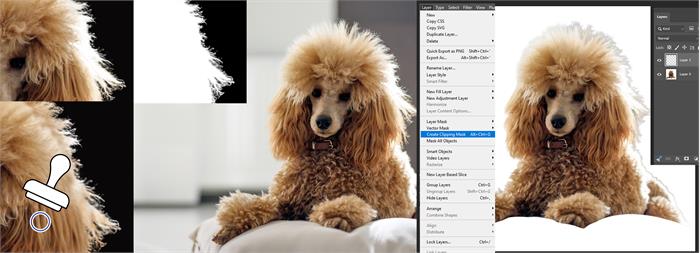 |
This is where a knowledge of some old school Photoshop technique comes in, but with a contemporary twist. A clipping path used to be drawn by hand using the pen tool, but now you can combine selection with a separate layer which has a transparent background. This gets round the limitations of select subject or object removal which while now very fast and flexible, still require some fine tuning for specific cases. This is most apparent if there is a colour conflict in the detail between one and the other .As you can see if you take a subject selected from a white background and place it on a much darker one, the difference screams out at you.
Sometimes it’s because the selection isn’t perfect and may need more refinement, but that is still tricky to do in selection masks and time consuming. That’s where a clipping mask may save some time by simply using the clone brush to paint over the edges of the mask to make a more seamless blend. Make sure the brush only affects the clipping mask layer and the subject selection immediately below and then use a small feathered one to selectively fill the edges. It may take a bit of practice because it's very much a case of being used to cloning - where to sample from, and how much to tackle at a time. This is very much old school with a new twist but it will produce better results and can’t be achieved at the moment by any type of quick fix.
Such instant editing solutions which are now widely promoted to catch the attention of the inexperienced or impatient, use very clever software which is actually already in Photoshop or any other comparable manipulation software. The difference is the manual control which allows actions to be minutely controlled, and if used correctly restored or recovered for output. This is vital for printing as transferring the digital information into pixels per inch will tend to compound any flaws in the original.
The range of slider controls in PS may look a little daunting or excessive but they all do things slightly differently, and the movement of each will make a difference in print, even if it is not immediately apparent on screen. That’s why a familiarity with these functions is important as it is unlikely to be the case with the customer. The most common issue, apart from a poorly taken image, is one that is overedited. And these days that is most likely caused by lettering the processor decide what it thinks is best. Ever since the first days of digital, when the pixel count of all camera devices was very low, the quest for the Holy Grail has been to magic up bigger numbers, especially to output in print.
For most of the last decades the search has produced not much more than the virtual equivalent of Fool’s Gold. I’ve tried them over the years, and all had flaws - mostly because although computers produce a picture for us to see, it doesn’t actually exist in an identical format for them and often what seems simply and logical to use just doesn’t compute.
More recently AI has opened opportunities to reinterpret existing pixels in a more creative manner, given that they are supposed to be trained to think more like us. So the restoration and repair of old, faded and damaged photos is becoming easier with the use of Neural filters, for example, can better identify human features in order to replace missing information, or remove distracting marks. This can result in some curious anomalies if the processor is left to its own devices, but then it is a learning curve for all of us.
One of the complications is the confusing number of options available, all of which use valuable time and resources without any clear guarantee of a successful outcome. Adobe has their own Firefly which has been in the toolbox for a while but has more recently added partner models, Flux, and Gemini with Nano Banana. But there is no user friendly guide to what they all do, or which is best for one particular picture. It’s up to the user to be the guinea pig and report back what doesn’t work and why.
The problem is you are paying for it in Credits whether you like it or not as there are no refunds, and there is a big difference in how many units are used up in each of the actions which is not immediately apparent. As a rule I have generally avoided using too many actions that would be counted as generative and therefore chargeable. But that is Adobe. Each of the partner models, and others, are available independently of course, you just need to weigh up the cost options, although it does seem the PS one is the more expensive.
If your first choice is just to press a button for a result then you inevitably pay the price. As an alternative I am testing out a plug-in which has much more user, and pocket friendly, approach. There’s an initial fee with a small transaction charge for each use if you go for the professional version. But that version gives you an extensive range of options for different types of images which is a key feature .
For the moment I have really only tested upscaling low resolution people images, as this is where most AI reconstruction fails. People just aren’t regular squares and shapes, and when a computer tries to recreate them we immediately see the imperfections or rather where human ones have been erased. Too many programmes that promise much just take a digital guess at filing in pixels rather than being able to recognise and reproduce existing patterns faithfully.
As a photographer I’m not easily pleased but I am impressed so far and will be able to report back after our summer break. The Plug in is called ETi Image Generator and is essentially an alternative to Adobe’s offerings but with many more options. It’s a little bit complex in its interface but for the moment I’ve been using Crystal to upscale low resolution pictures from the old archives when you couldn’t upload much more than a megabyte in size, and it's quite impressive. It’s a function that won’t just be useful for older low resolution files, but for new ones saved and resaved on phones and social media till they are a mere shrunken skeleton of the original. But being able to rescue those bones could be invaluable in future.
https://university.pouyaeti.com/eti-image-photoshop-plugin